跳到內容
關於我 數位花園

css

2 篇文章擁有標籤:“css”

[CSS] Tailwind 主題色的切換

必備知識:CSSHTMLJSReact

Tailwind 提供了深色模式(Dark Mode),可以自行設定深色模式時的樣式,只要在 CSS class 前面加上 dark: 關鍵字:

<div class="text-black dark:text-white">
{/* ... */}
</div>

假如我們要做「主題色切換」的功能,dark: 這個用法也許可行,但也只限於兩個主題色的切換,另一個缺點就是到處都要加上 dark: 的切換樣式,這聽起來不是一個好的做法。

想跳過本文廢話、直接看最終實作結果的同學,請走傳送門

在 Tailwind config 的自定義主題色盤

Section titled “在 Tailwind config 的自定義主題色盤”

在 Tailwind 的 config 當中,其中一個客制化的選項,就是可以自定義顔色的 class,例如:

module.exports = {
theme: {
colors: {
primary: "#0d6efd",
secondary: "#6c757d",
danger: "#dc3545",
warning: "#ffc107",
},
},
};

PS. 以上的名稱及色碼取自 Bootstrap 的主題色盤

若我們有兩個主題色,config 就必須寫成這樣:

module.exports = {
theme: {
colors: {
"theme-1-primary": "#0d6efd",
"theme-1-secondary": "#6c757d",
"theme-1-danger": "#dc3545",
"theme-1-warning": "#ffc107",
"theme-2-primary": "#0d6efd",
"theme-2-secondary": "#6c757d",
"theme-2-danger": "#dc3545",
"theme-2-warning": "#ffc107",
},
},
};

如此一來,就要在 HTML 上去抽換不同主題的 class:

function Button() {
const buttonTheme = isTheme1 ? 'bg-theme-1-primary' : 'bg-theme-2-primary';
return <button className={buttonTheme}>;
}

到處都要有這樣的判斷,看來也不是明智的做法。此外,若我們有四、五個主題要切換,就不是三元運算可以簡單解決的事。

CSS 提供了變數的功能,可分爲區域變數與全域變數。

定義 CSS 區域變數,下面這個 --main-bg-color 只能在這個 scope({} 刮號)裡面使用:

element {
--main-bg-color: brown;
}

比較常見使用 CSS 變數的方式,是使用 CSS 全域變數,建立一個稱作 :root 的 pseudo-class,裡面定義的變數在整個 HTML document 底下都可以使用(其實就是全域變數了):

:root {
--main-bg-color: brown;
}

使用 CSS 變數時,用 var() 這個函式,將要使用的變數作爲參數傳進去:

element {
background-color: var(--main-bg-color);
}

我們結合 Tailwind 及 CSS 變數的特性,就可以達到主題色盤抽換的目的,我們將方才 config 中寫死的色碼,用 CSS 變數取代:

module.exports = {
theme: {
colors: {
'color-one': 'var(--color-one)',
'color-two': 'var(--color-two)',
'color-three': 'var(--color-three)',
'color-four': 'var(--color-four)',
'color-five': 'var(--color-five)',
},
}
}

設定好 Tailwind config 之後,接著就是定義各主題色盤變數的時候了

const theme_ayanami = `
:root {
--color-one: #1d446c;
--color-two: #f1f1f1;
--color-three: #571a1a;
--color-four: #000000;
--color-five: #525252;
}
`;
const theme_ikari = `
:root {
--color-one: #3f6d4e;
--color-two: #8bd450;
--color-three: #1d1a2f;
--color-four: #965fd4;
--color-five: #734f9a;
}
`;

然後將變數包在 <style> 後,安插在 <head> 裡面:

function App() {
const [currentTheme, setCurrentTheme] = useState("ayanami");
const getThemeVariables = (_theme) => {
switch (_theme) {
case "ayanami":
return theme_ayanami;
break;
case "ikari":
return theme_ikari;
break;
}
};
useEffect(() => {
if (!document.getElementById("customThemeId")) {
const head = document.head;
const newStyleElement = document.createElement("style");
head.appendChild(newStyleElement);
newStyleElement.id = "customThemeId";
newStyleElement.innerHTML = getThemeVariables(currentTheme);
} else {
const styleElement = document.getElementById("customThemeId");
if (styleElement) {
// 更新 CSS 全域變數
styleElement.innerHTML = getThemeVariables(currentTheme);
}
}
}, [currentTheme]);
return (
<div>
<button onClick={() => setCurrentTheme("ayanami")}>凌波零</button>
<button onClick={() => setCurrentTheme("ikari")}>碇真嗣</button>
</div>
);
}

在這裡定義了兩個主題,分別是「零號機」與「初號機」的主題色,此後,就可以在 HTML 上使用了,例如:

<div class="bg-color-one"></div>

藉由抽換 <style> 的内容,將新切換的主題變數複寫進去,便可以主題切換了!

從瀏覽器的 Dev Tools 中,可以看到我們只抽換了 CSS 的全域變數,元件的部分都沒有異動

同場加映!「初音未來」跟「涼宮春日」的主題色!😘

若想看整個範例的結果,請前往這裡

範例原始碼,請參考這裡

我們利用 CSS 全域變數的特性,並搭配 Tailwind 的客制化顔色設定,實現了主題色切換的目的。優點非常顯著,我們在切換主題的時候,不用動用任何一行原本的 HTML、不用改動任何的 CSS class,也不用在元件裡面寫切換主題的邏輯,就可以快速達成主題切換的效果。

再來是 CSS 全域變數的部分,各主題的變數其實就是一個字串,上面的範例直接放在 JS 裡面,因此若遇到要更新主題顔色、或新增新主題色時,仍必須重新打包(build)一次前端的專案。若要避免重新打包,就要看 CI/CD 的架構策略,將這些字串移到別的地方,然而這不在我目前擅長的領域,也非本次討論的重點,就交由各位同學去發揮吧!

以上,Tailwind 主題切換分享到這裡,祝各位開發愉快 😎
行動裝置上 100vh 的奇怪行爲

最近遇到一個手機瀏覽器上,在某個特定排版會發生高度有誤的問題

進而發現手機瀏覽器的特殊行爲

查了一下資料,發現這個問題已經存在許久,也有不少的解法

大致分為用 JS 及 CSS 去解決

CSS 的解決方式比較簡單明瞭

想要直接看結果,可以走傳送門:JS 解決方案CSS 解決方案

這個頁面是滿版的,所以 container 的部分佔滿整個 document.body

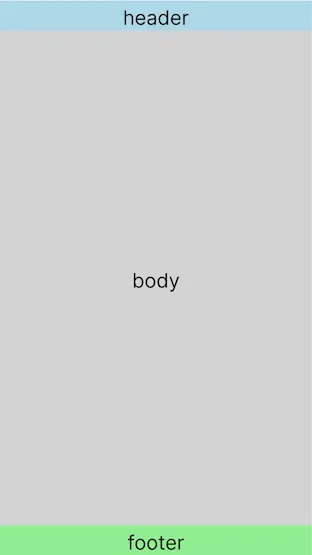
container 裡面,由上而下包含三個區域:header、body、footer

header 與 footer 分別固定在 container 上緣與下緣,body 撐滿剩下的空間,如果内容超過就會有捲軸滾動

layout 的示意圖如下:

layout

外層的 container 寬高分別是 100vw、100vh,在電腦上看起來沒什麼問題,然而在手機上就不是那麼回事:

100vh-issue-1

可以看到 container 高度是 100vh,卻仍然可以 scroll 的現象,照理來說應該要剛好撐滿才是

備註:可以在手機上點開連結,看一下真實情況


因此,若將 container 裡面的東西加進來,就會造成內外都有 scroll 的情況:

100vh-issue-2


看來 CSS 所抓到的 100vh,跟實際上的 window 高度不一樣,window 比較小,所以造成了 scroll

於是,試著把 container 元素的高度與 window 的高度印出來

var containerElement = document.getElementById("container");
var containerHeight = containerElement.clientHeight;
var heightElement = document.getElementById("container-height");
heightElement.innerText = "container clientHeight: " + containerHeight + "px";
var windowHeightEl = document.getElementById("window-height");
windowHeightEl.innerHTML = "window innerHeight: " + window.innerHeight + "px";

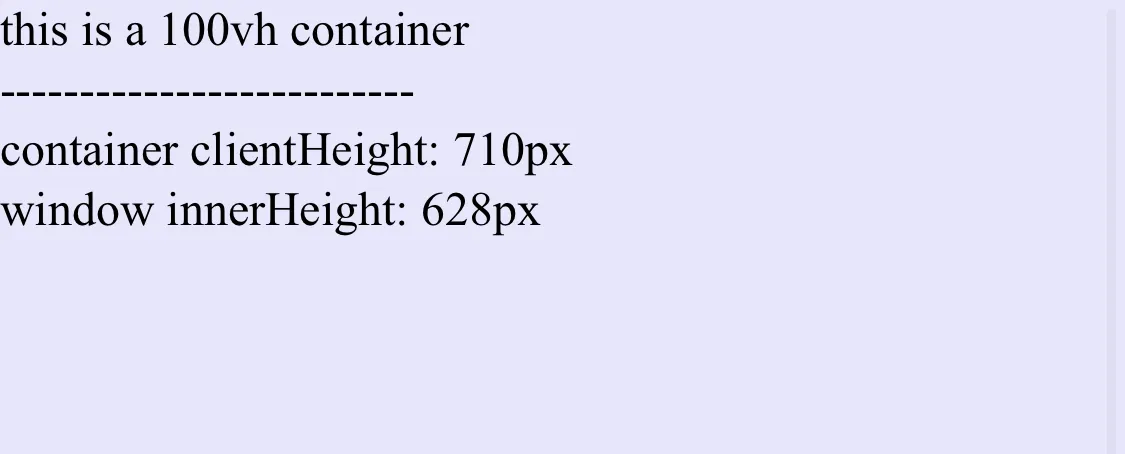
在電腦瀏覽器上,這兩個數字會是一樣的,在手機上卻不同:

different-height

查了一下網路上的資料,大概有兩種方式可以解

一個是用 JS,一個是用 CSS

於是我加上一個 resize 事件,監聽 window 的高度變化,並顯示在畫面上:

var containerElement = document.getElementById("container");
var containerHeight = containerElement.clientHeight;
var heightElement = document.getElementById("container-height");
heightElement.innerText = "container clientHeight: " + containerHeight + "px";
function updateWindowHeight() {
var windowHeightEl = document.getElementById("window-height");
windowHeightEl.innerHTML = "window innerHeight: " + window.innerHeight + "px";
}
updateWindowHeight();
window.addEventListener("resize", updateWindowHeight);


在 iOS Chrome 上,可以看出兩者的高度並不一致:

100vh-issue-3-ios-chrome



iOS 的 Safari,除了 container 與 window 高度不同之外,還發現了另一個現象

100vh-issue-3

在最頂的時候往下滑動,window 的高度是動態的

mind-explosion

在 Android Chrome 上,也出現 window 變化的狀況,但還是有點差異

100vh-issue-3-android-chrome

原來是彩蛋啊!!🥚

既然 100vh 與 window 的高度會不一致,而且在 iOS Safari 與 Android Chrome 上還會不斷改變, 那麼就在監聽 windowresize 事件時, 將 container 元素的高度複寫成當下的 window 高度就行了:

(function () {
function updateWindowHeight() {
var currentWindowHeight = window.innerHeight;
var windowHeightEl = document.getElementById("window-height");
windowHeightEl.innerHTML = "window innerHeight: " + currentWindowHeight + "px";
var containerElement = document.getElementById("container");
containerElement.style.height = currentWindowHeight + "px";
var containerHeight = containerElement.clientHeight;
var heightElement = document.getElementById("container-height");
heightElement.innerText = "container clientHeight: " + containerHeight + "px";
}
updateWindowHeight();
window.addEventListener("resize", updateWindowHeight);
})();

100vh-issue-4

我們可以看到,container 高度與 window 高度,始終保持同步,也就避免出現外層 scroll 的情況發生了

100vh-issue-rotate

旋轉螢幕也不是問題~

既然 container 的高度解決了,再將 container 裡面的 header、body、footer 加進來:

100vh-issue-final

一切看來都非常美好 😎

至於 resize 事件是否要加入 debounce 增進效能,那就看個人選擇了

CSS 的方法有分幾種:

.container {
display: flex;
flex-direction: column;
width: 100vw;
height: 100vh;
max-height: -webkit-fill-available; // 加上 fill-available
background: lavender;
}

但如同前綴 -webkit- 的字面意義,在 Android Chrome 上仍然有問題

但 Windows 及 macOS 上的 Chrome 卻沒事

ChromeSafari
macOSOO
WindowsONA
iOSOO
AndroidXNA

將 html 與 body 的高度設為 100%,底下的 container 就放心地用 100%

完全將在 mobile 上有爭議的 vh 單位移除了,是一個簡潔的方式

html,
body {
margin: 0;
padding: 0;
height: 100%; // 用 100%
width: 100%;
}
.container {
display: flex;
flex-direction: column;
width: 100%;
height: 100%; // 這裡也用 100%
background: lavender;
}

所有平台及裝置的瀏覽器都通過了考驗 💯

ChromeSafari
macOSOO
WindowsONA
iOSOO
AndroidONA

有一個人分享了利用新 CSS 單位的解法,也是一個不錯的選擇:

.container {
display: flex;
flex-direction: column;
width: 100%;
height: 100dvh; // 用單位 dvh
background: lavender;
}

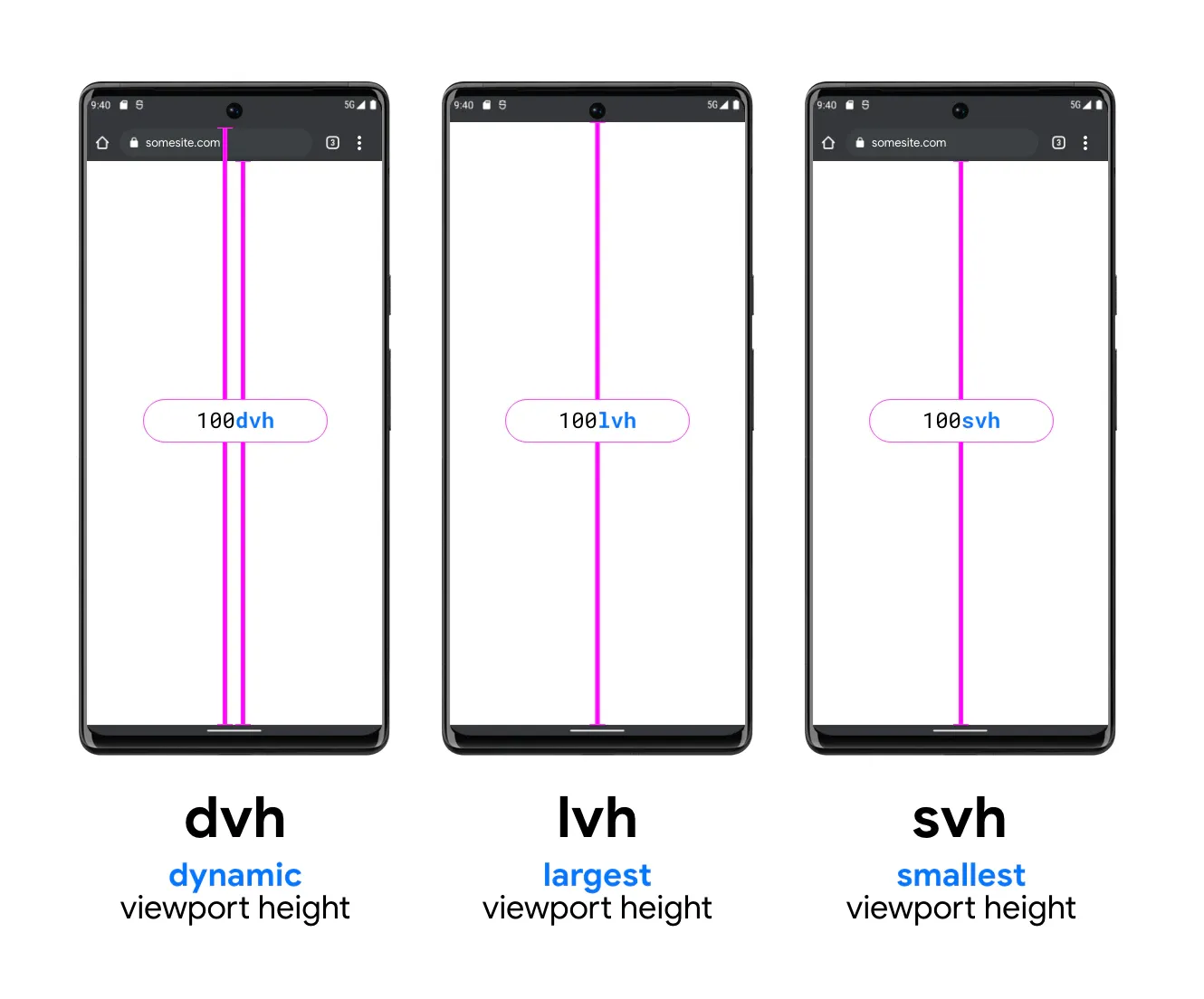
關於 dvh 的示意圖如下:

new unit

PS. 本圖來自 Google IO

但這個似乎還很新,看來支援度沒有太好

簡單測試了一下,在 Safari 可以正常運作,但是 Chrome 卻不認識這個單位

ChromeSafari
macOSXO
WindowsXNA
iOSOO
AndroidXNA

支援度可以參考:“dvh” | Can I use… Support tables for HTML5, CSS3, etc

之後想要來研究一下關於 dvh 這一類給 mobile 專用的單位

ChromeSafari
MacOSOO
WindowsONA
iOSXX
AndroidXNA
  • O:代表 100vh 與 window 高度一致
  • X:代表 100vh 與 window 高度不同
  • NA:此平台無此瀏覽器
ChromeSafari
iOSXO
AndroidONA
  • O:代表 window 高度會隨 scroll 變化
  • X:代表 window 高度固定
  • NA:此平台無此瀏覽器
OSChromeSafari
iOS15.15103.0.5060.6315.15
Android11103.0.5060.71NA

這次因為使用了滿版 layout 搭配 100vh,而發現了這個水很深的問題

iOS Safari 在往下滑動時,window 會不斷改變的現象,確實是大開眼界

總結下來,JS 的解法需要去監聽 resize 事件, 此外大概不可避免要搭配 debounce,會需要寫很多的程式碼, 還需要在適當的時機取消訂閱 resize 事件,避免記憶體洩漏問題, 簡單來說為了效能及資源,都要額外再做其他事

CSS 的三種解法都相對簡單,沒有太多的程式碼

但唯有第二個解法(html、body 設為 100%)通過了所有瀏覽器的考驗

第三個解法(新單位 dvh)雖然現在有相容性問題,但未來的可用性令人期待